 How can I tell if I need to have a quote approved?
Your plan document will tell you if the funding or item is quote required.
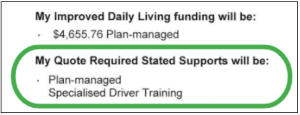
It is also important to check how the funding is managed.
P2P can only pay for Plan Managed funding. If it is NDIA managed, you can only use a registered provider and they will need to claim for the support directly from the NDIA.
If you have quote required funding, you will need to follow the steps below to have your invoice paid.
 Step 1: Find a Provider and get a Quote
Look for a provider that you wish to use to purchase the support or items. You may wish to look around at a few options to find the best option and value for money.
Once you have chosen a provider, you can ask them for a quote.
 Step 2: Submit the Quote to the NDIA
Your provider can help you do this. Otherwise you can email your quote to enquiries@ndis.gov.au
It is worth contacting your NDIA planner or LAC to let them know that you have sent the quote.
It can take a little while for the approval to be given. Keep an eye in your MyPlace Participant Portal or contact your NDIA planner for an update.
 How can I tell if I need to have a quote approved?
Once the quote is approved, get in touch with your provider to ask for an invoice.
You can then send this invoice to the P2P plan management team and let us know your quote has been approved. We will be able to add this additional funding into your plan to claim for the quote required support.