
What are my invoice approval options?

What are my invoice approval options?

You have two options for how your invoices will be processed and you can make a change to this process at any time.

Pay on approval

  • Your provider will send the invoices via email to P2P.
  • You will be sent an approval request via email for each invoice (except reimbursements) where you choose to approve or reject.
  • After 2 days, if you have not answered, the invoice will be claimed.
  • You can review your invoices at any time by logging into your Platform account or by checking your monthly report.

Pay on receipt

  • Your provider will send the invoices via email to P2P.
  • P2P will process the invoice directly without sending it to you for approval. 
  • You can review your invoices at any time by logging into your Platform account or by checking your monthly report. 
  • You can also choose to have providers you wish to check send their invoices directly to you first.


What do I have to do to approve or reject an invoice?

If you choose the pay on approval option, everytime we enter an invoice we will send you a unique link to view and approve your invoice. This request will come via email to the account nominated by you. 

You will not have to log into the Platform to do this, you just need your email account open.


How does this impact my claims? 

The process for claiming invoices from NDIS funding is shown below. There is one additional step for participants who choose the pay on approval option.
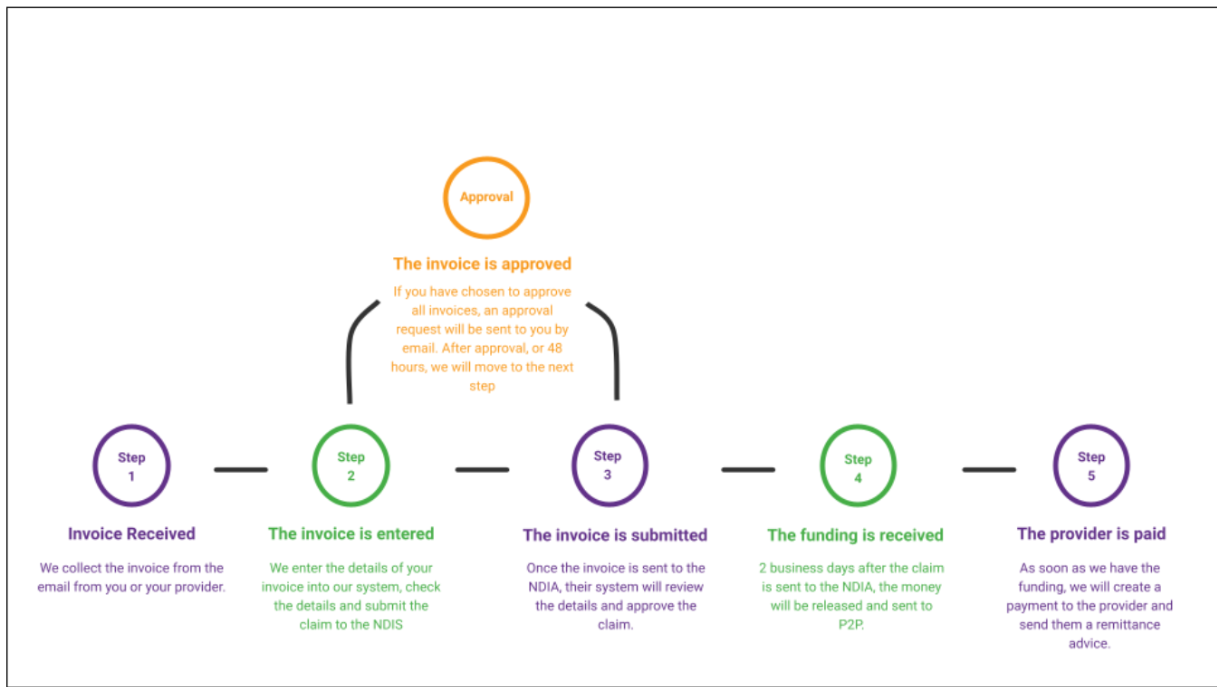
Invoice prosses